Jetstream · Stream Deck plugin for Claude Code · free & open source
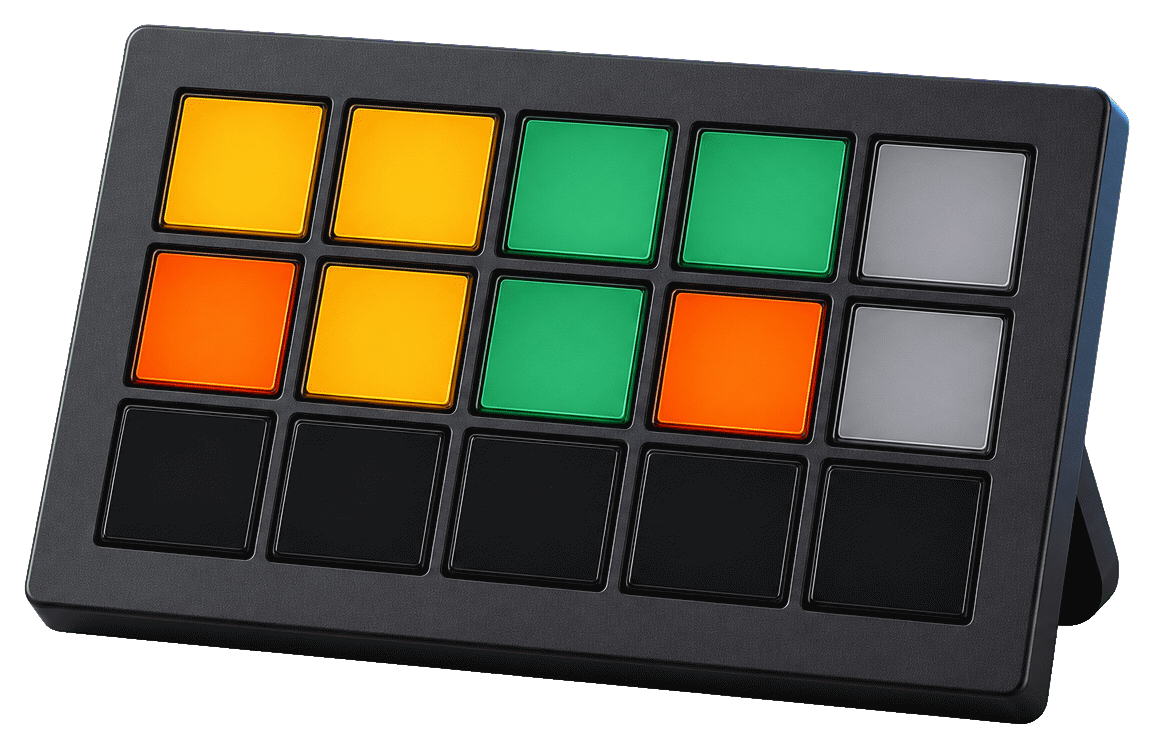
One physical key per Claude Code project — working orange, needs-you amber, done green. Answer permission prompts with a keypress, and build the board by talking to it.
npm i -g @pimmesz/jetstream
⋯working !needs you ✓done ·idle
The problem
"Is anything waiting on me?" — that's the real question when Claude Code runs across five repos, and Jetstream answers it from across the room. Every project gets a key with its own live state: ⋯ working, ! needs-you, ✓ done. A stuck agent is a glowing amber key — not a silently wasted afternoon.
| Project | Activity | Status |
|---|---|---|
| falcon | working | 12m |
| api | approve? | needs you |
| web | +120/-40 | done 4m |
| docs | working | 3m |
| infra | idle | — |
Short-press opens the project in your editor; long-press interrupts the session. Done keys show the change size — +120/-40 · done 4m.
One always-visible key counting the whole fleet (3w 1! 2✓), coloured by the worst state present — so projects can outnumber keys.
Answer the oldest pending Claude permission request straight from the deck. No press within ~90s and Claude falls back to its own dialog.
Your real 5h and 7d subscription windows, plus the sooner reset — resets 3h33m.
A doorbell key that flashes when a request goes unanswered, covering every repo in your config.
Preset headless claude -p launches, usable inside Stream Deck multi-actions.
Five repos, one glance. The board tells you which agent is stuck, which is done, and which just needs a yes.
Setup
Needs an Elgato Stream Deck (any model), Node.js 22.12+, and Claude Code logged in with your subscription (claude → /login). Leave ANTHROPIC_API_KEY unset — Jetstream strips it from anything it spawns, so a keypress can never silently bill the metered API.
npm i -g @pimmesz/jetstream jetstream install # hands the plugin to the Stream Deck app — approve there jetstream chat # conversational — "3 repos in ~/dev", "add a Telegram key at a8" jetstream init # or the guided wizard: repos, theme, a ready-made layout jetstream doctor # read-only health check when the board isn't lighting up
On first launch the plugin wires two hooks into ~/.claude/settings.json, backing the file up first: the status hook that lights the board, and the permission hook that lets Approve/Deny answer prompts from the deck. No terminal step. Restart any running claude sessions to pick them up — and if you remove the hooks, they stay removed.
Control
jetstream chat takes plain English and applies it live — no re-import, no dragging:
$ jetstream chat add falcon and api from ~/dev, put the usage gauge at a3 ✓ 2 project keys placed · usage gauge at a3 make docs purple, give the telegram key its real logo ✓ board updated — live, no re-import
jetstream init is the guided version: it scans a folder for repos, writes your config, wires the hooks, and can prebuild a ready-made layout for a Mini, MK.2, or XL.
Every state also carries a glyph (⋯ ! ✓), so the board reads without relying on colour — and the settings key's high-contrast theme swaps the red/green pair for orange/blue.
Mechanism · datasheet
Nothing is device-specific, nothing leaves your machine, and watching costs you no quota.
Claude Code's own hooks tell the plugin what each session is doing over 127.0.0.1 — never the network. The status hook reports lifecycle events; the permission hook additionally holds a pending prompt briefly so a deck key can answer it.
Each Project key holds its own name and path, so everyone's board is their own. Drag as many as your device has — Mini 6, MK.2 15, XL 32, Neo — or let init prebuild a starting layout.
Open the project, interrupt a run, approve or deny a permission prompt, or fire a preset headless launch. The deck stops being a read-only dashboard.
projects.json defines every repo in one place, so the Fleet roll-up and Attention doorbell cover projects you never gave a key.
claude -p on a separate allotment; the 5h/7d gauge doesn't move, and ANTHROPIC_API_KEY is stripped from every spawn.Free · Apache-2.0 · works on any Stream Deck
npm i -g @pimmesz/jetstream
Reference
Mirrored automatically from the README — the single source of truth.
Claude Code, logged in with your subscription (claude → /login). Leave
ANTHROPIC_API_KEY unset: Jetstream strips it from anything it spawns so a keypress
can never silently bill the metered API.
Jetstream: npm i -g @pimmesz/jetstream, then
jetstream install — it hands the packed plugin to the Stream Deck app; approve
the install prompt there. (Updating? Re-run the same two commands.) That's it — on first
launch (once, recorded in a marker next to projects.json) the plugin wires two hooks
into ~/.claude/settings.json, backing the file up first: the per-project status
hook (lights the board) and the permission hook (lets Approve/Deny keys answer
Claude's permission prompts from the deck — while the plugin runs, an unanswered prompt
falls back to Claude's own dialog after ~90s). No terminal step. Restart any running
claude sessions to pick the hooks up. Remove the hooks from settings.json and they
stay removed — re-wire any time with jetstream setup. The usage/statusline hook is
installed automatically on first launch if you have no statusline yet (re-wirable via the CLI commands below).
With the plugin installed (step 2 above), set up your fleet — two ways, both via the jetstream CLI:
jetstream chat # conversational — "3 repos in ~/dev: …", "add a Telegram key at a8"
jetstream init # guided wizard — repos, theme/timings, a ready-made layout
chat lets you describe repos AND arrange keys in plain English (add app/URL/run shortcuts,
recolour, rename, set emoji/logo icons), applied live.
init asks for your repos (or scans a folder), your theme and timings, writes
projects.json (see below), wires the hooks — and can prebuild a ready-made key
layout for your deck (Mini / MK.2 / XL) as a Jetstream.streamDeckProfile in
~/Downloads you double-click to import. The import installs it as a new profile on the device you
pick in the dialog; your existing layout is never touched. (The layout file mirrors the
profile format Elgato's own plugins ship, but treat it as experimental — dragging keys
by hand always works.)
The smaller pieces still exist: setup (hooks + a starter projects.json template),
hooks install (only the hooks; the old bin/hooks-install.js still works, and
--tool-detail adds the active-tool hooks), and doctor (read-only health check for
when the board isn't lighting up).
Drag keys onto your deck: Project status (set a name + project path per key;
short-press opens the project folder in your editor (VS Code → Cursor → $EDITOR, else the OS
folder opener), long-press interrupts the session; done keys show the
change size, +120/-40 · done 4m), Fleet roll-up (one always-visible key counting the whole
fleet — 3w 1! 2✓ — coloured by the worst state present, so "is anything waiting on me?" is
answerable even when projects outnumber keys), Attention (flashes if a request goes
unanswered), Usage gauge (5h/7d used + the sooner reset, resets 3h33m), CI / PR status (one
always-visible key: the worst CI state across your open afterburner/ PRs — green / red /
running — flashing when CI newly fails; needs the gh CLI logged in), Launch preset
(now usable inside Stream Deck multi-actions), Approve / Deny (place one of each — they answer
the oldest pending Claude permission request straight from the deck; no press within ~90s → Claude
falls back to its normal dialog), and Jetstream settings (press to toggle colour-blind mode;
its inspector sets escalation/long-press/refresh). Amber keys distinguish a deck-answerable prompt
(!, approve?) from an open question you must type (?, answer).
Every state also carries a glyph (⋯ working, ! needs-you, ✓ done), so the board reads
without relying on colour — and the settings key's high-contrast theme swaps the red/green pair
for orange/blue
Nothing is device-specific — you drag as many keys as your device has (Mini 6, MK.2 15, XL 32,
Neo). No fixed layout is required — drag keys wherever you like, or let jetstream init prebuild
a starting layout (Mini / MK.2 / XL); each Project key holds its own name+path, so everyone's
board is their own. (Stream Deck + dials / touch strip aren't used yet — a future item.)
Define your whole fleet in one place instead of a placed key per repo — jetstream init
builds this file for you, or write it by hand. Jetstream reads
$XDG_CONFIG_HOME/jetstream/projects.json (else ~/.config/jetstream/projects.json;
%APPDATA%\jetstream\projects.json on Windows) at startup:
{
"projects": [{ "id": "falcon", "name": "Falcon", "path": "/Users/you/falcon" }]
}
The Fleet roll-up and Attention doorbell then cover every repo in the file, so placed
Project keys become optional focused jump-to buttons rather than the only way the plugin learns
your repos. An optional "settings" block (theme, longPressMs, usageRefreshSec,
escalateAfterSec) presets the plugin config on a fresh install — the Settings key still wins at
runtime. Run jetstream.js doctor to check the file is parseable.
Working keys can show the current tool (Bash · 12m) instead of just working 12m. It needs the
higher-overhead PreToolUse/PostToolUse hooks (a hook process per tool call), so it's opt-in:
node "<plugin folder>/bin/jetstream.js" hooks install --tool-detail
claude -p, which draws the separate Agent-SDK
allotment — it does not move the 5h/7d gauge.127.0.0.1, never the network). The status hook reports lifecycle events; the
permission hook additionally holds a pending prompt briefly so a deck key can answer
it (falling back to Claude's own dialog after ~90s when unanswered).Elgato ships an official MCP server (npm install -g @elgato/mcp-server, Stream Deck app
7.4+, enable MCP Deck in Preferences → General) that lets an AI assistant trigger
actions — but only ones you've placed on the dedicated MCP Actions profile; your other
profiles stay private. Jetstream keys work there like any action, so "approve the pending
Claude prompt" by voice/text is possible. Two caveats: the MCP server can trigger keys,
never build layouts (that's what jetstream init is for), and its actions fire without
per-call confirmation — use the stdio transport, skip the ngrok/HTTP modes, and only place
keys you'd let an AI press.
pnpm --filter '@pimmesz/jetstream' run check # typecheck + tests
pnpm --filter '@pimmesz/jetstream' run build # bundle into the .sdPlugin
pnpm --filter '@pimmesz/jetstream' run validate # Elgato manifest validation
pnpm --filter '@pimmesz/jetstream' run pack # produce the .streamDeckPlugin